

Views:472 Time:2015-06-29
Description
When the DWG (Dinstar Wireless Gateway) as termination, the channel will try to call out again and again without break, the GSM carrier can detect and block the SIM card base this condition. For example, I want each channel have break after try to attached call, the break time need random, like 2-3 minutes.
Solution:
At page System Configuration>>>>Service Parameter, have are option “Call Interval”, set it the 120-180, that’s means the DWG will make are random value between 120-180 and let the channel break, the break interval is that random value.
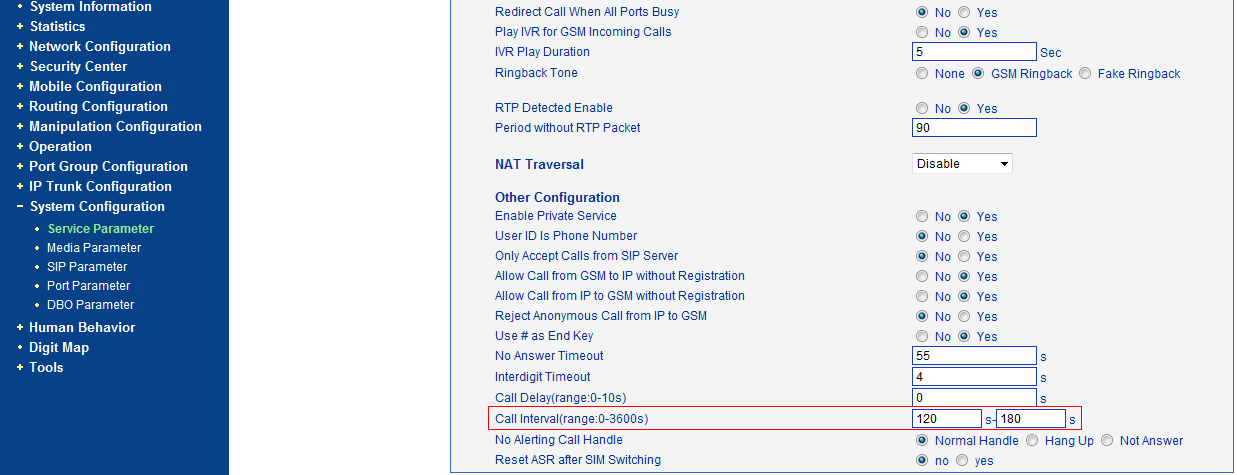
Note: at this page have are option “Call Delay”, this option means the interval between the SSW (Softswtich) send traffic to DWG and the DWG forward it to GSM side. Default value is 0 that’s means the DWG forward the traffic directly without any delay. Don’t confuse it with break time.